<?xml version="1.0" encoding="utf-8"?><feed xmlns="http://www.w3.org/2005/Atom" xml:lang="en_US"><generator uri="https://jekyllrb.com/" version="4.3.3">Jekyll</generator><link href="https://azure.github.io/feed.xml" rel="self" type="application/atom+xml" /><link href="https://azure.github.io/" rel="alternate" type="text/html" hreflang="en_US" /><updated>2024-01-09T09:58:27+00:00</updated><id>https://azure.github.io/feed.xml</id><title type="html">Azure App Service</title><subtitle>Announcements, updates, and release notes from the Azure App Service product team.</subtitle><author><name>Azure App Service</name></author><entry><title type="html">Improvements to DNS configuration and name resolution in App Service</title><link href="https://azure.github.io/2024/01/09/DNS-improvements.html" rel="alternate" type="text/html" title="Improvements to DNS configuration and name resolution in App Service" /><published>2024-01-09T00:00:00+00:00</published><updated>2024-01-09T00:00:00+00:00</updated><id>https://azure.github.io/2024/01/09/DNS-improvements</id><content type="html" xml:base="https://azure.github.io/2024/01/09/DNS-improvements.html"><![CDATA[<p>More than a year ago we started a journey to improve the DNS configuration and name resolution in App Service. The mission was and is to improve in several areas:</p>

<ul>
  <li>Documentation improvements</li>
  <li>Parity between Windows and Linux</li>
  <li>Configuration using site properties</li>
  <li>Azure Portal configuration</li>
  <li>Logging capabilities</li>
</ul>

<p>In this blog post I wanted to share some details of what we are building and the current progress of each area.</p>

<h2 id="documentation-improvements">Documentation improvements</h2>

<p>DNS configuration and name resolution now has its own article in the public documentation. This documentation goes into details with how the name resolution works and what configuration options exist. If you have not yet seen this <a href="https://learn.microsoft.com/azure/app-service/overview-name-resolution">article</a>, I suggest you start by reading it to provide context for the rest of this post.</p>

<h2 id="parity-between-windows-and-linux">Parity between Windows and Linux</h2>

<p>When DNS servers are explicitly configured in App Service using App Settings or site properties, there was no difference in behavior of how Windows and Linux handled the configured servers. However, when using DNS servers configured in the virtual network, Windows apps had a behavior that would sort the list of DNS servers and only select the first two DNS server IP addresses to be used for name resolution. This could impact the name resolution behavior if you had more than two servers configured and/or the order of the servers mattered.</p>

<p>About a year ago we aligned the behavior with Linux allowing up to five servers to be used and removed the sorting. To prevent breaking changes to customers that intentionally or unintentionally had taken a dependency on the sorting, we made “no sorting” the default behavior for new sites created and an opt-in option for existing sites. For most customers this doesn’t have an impact. The combination of using DNS servers from the virtual network, having more than two DNS servers configured and the order having an impact is very rare.</p>

<p>Should you however have this exact scenario, you can validate if your site is still using DNS server sorting by calling this command:</p>

<div class="language-bash highlighter-rouge"><div class="highlight"><pre class="highlight"><code>az rest <span class="nt">--method</span> GET <span class="nt">--uri</span> /subscriptions/&lt;sub-id&gt;/resourceGroups/&lt;resource group&gt;/providers/Microsoft.Web/sites/&lt;site name&gt;?api-version<span class="o">=</span>2022-03-01 <span class="nt">--query</span> <span class="s1">'properties.dnsConfiguration'</span>
</code></pre></div></div>

<p>and look for the following property:</p>

<div class="language-javascript highlighter-rouge"><div class="highlight"><pre class="highlight"><code><span class="p">{</span>
   <span class="dl">"</span><span class="s2">dnsLegacySortOrder</span><span class="dl">"</span><span class="p">:</span> <span class="kc">true</span>
<span class="p">}</span>
</code></pre></div></div>

<p>If the property is returned, you can opt in to the new “no sorting” behavior by calling this command:</p>

<div class="language-bash highlighter-rouge"><div class="highlight"><pre class="highlight"><code>az rest <span class="nt">--method</span> POST <span class="nt">--uri</span> /subscriptions/&lt;sub-id&gt;/resourceGroups/&lt;resource group&gt;/providers/Microsoft.Web/sites/&lt;site name&gt;/disableVirtualNetworkDnsSorting?api-version<span class="o">=</span>2022-03-01
</code></pre></div></div>

<p>Another difference that existed between Windows and Linux was the default behavior of name resolution. You can configure retry timeout, retry count and cache timeout, but all of them have default values. You can see the current values in the documentation and we are currently rolling out a change to align the default values. Once the current update is rolled out, the defaults will be as listed in the next section.</p>

<h2 id="configuration-using-site-properties">Configuration using site properties</h2>

<p>Currently, the most common way of configuring DNS settings is to use App Settings. However, App Settings have some challenges that make them less appealing:</p>

<ul>
  <li>They are subject to spelling mistakes and there is no API level validation.</li>
  <li>You can’t control/audit using Azure Policy.</li>
  <li>You need write permissions to read the values (because App Settings often contain secrets, they have this extra layer of security).</li>
</ul>

<p>To meet these challenges we are introducing site properties for all DNS configurations. The App Settings will continue to work, but the site properties will take precedence if configured. The properties are grouped under the <code class="language-plaintext highlighter-rouge">dnsConfiguration</code> property.</p>

<table>
  <thead>
    <tr>
      <th><strong>Property name</strong></th>
      <th><strong>App Setting</strong></th>
      <th><strong>Allowed values</strong></th>
      <th><strong>Default value</strong></th>
      <th><strong>Description</strong></th>
    </tr>
  </thead>
  <tbody>
    <tr>
      <td>DnsServers</td>
      <td>WEBSITE_DNS_SERVER</td>
      <td>IPv4 addresses</td>
      <td>none</td>
      <td>Overrides Azure default DNS or DNS servers inherited from virtual network. Allows up to five servers.</td>
    </tr>
    <tr>
      <td>DnsAltServer</td>
      <td>WEBSITE_DNS_ALT_SERVER</td>
      <td>IPv4 address</td>
      <td>none</td>
      <td>Appends this specific DNS server to the list of DNS servers configured. This will be appended to both explicitly configured DNS servers and DNS servers inherited from the virtual network.</td>
    </tr>
    <tr>
      <td>DnsMaxCacheTimeout</td>
      <td>WEBSITE_DNS_MAX_CACHE_TIMEOUT</td>
      <td>0-60</td>
      <td>30</td>
      <td>Cache timeout defined in seconds. Setting cache to zero means you’ve disabled caching.</td>
    </tr>
    <tr>
      <td>DnsRetryAttemptTimeout</td>
      <td>WEBSITE_DNS_TIMEOUT</td>
      <td>1-30</td>
      <td>3</td>
      <td>Timeout before retrying or failing. Timeout also defines the time to wait for secondary server results if the primary doesn’t respond.</td>
    </tr>
    <tr>
      <td>DnsRetryAttemptCount</td>
      <td>WEBSITE_DNS_ATTEMPTS</td>
      <td>1-5</td>
      <td>3</td>
      <td>Defines the number of attempts to resolve where one means no retries.</td>
    </tr>
  </tbody>
</table>

<p><code class="language-plaintext highlighter-rouge">DnsAltServer</code> and, as mentioned before, the new default values are currently rolling out. All other properties are available today.</p>

<h2 id="azure-portal-configuration">Azure Portal configuration</h2>

<p>Based on the new properties, we have started to build UX to support the configurations. This will give you one place to view and configure all DNS options. The configuration page will be available from the networking hub page and we aim to have it ready in Q2 2024.</p>

<h2 id="logging-capabilities">Logging capabilities</h2>

<p>Finally, we have been working on improved logging capabilities. We started by adding logging capabilities to our support staff to help them help you troubleshoot DNS behavior issues. Building on the learnings from our internal use, we will be adding a new logging category to Diagnostics logs to allow you to send name resolution logs to Azure Monitor. We expect this capability to land in H2 2024.</p>]]></content><author><name>Azure App Service</name></author><summary type="html"><![CDATA[More than a year ago we started a journey to improve the DNS configuration and name resolution in App Service. The mission was and is to improve in several areas:]]></summary></entry><entry><title type="html">General availability of Diagnostics tools for App Service on Linux Node.js apps</title><link href="https://azure.github.io/2024/01/05/Diagnose-Tools-for-NodeJs-Linux-apps.html" rel="alternate" type="text/html" title="General availability of Diagnostics tools for App Service on Linux Node.js apps" /><published>2024-01-05T00:00:00+00:00</published><updated>2024-01-05T00:00:00+00:00</updated><id>https://azure.github.io/2024/01/05/Diagnose-Tools-for-NodeJs-Linux-apps</id><content type="html" xml:base="https://azure.github.io/2024/01/05/Diagnose-Tools-for-NodeJs-Linux-apps.html"><![CDATA[<p>We are pleased to announce the public availability of Diagnostic tools for App Services Linux for Node.js apps. With this capability, we now offer built-in support for collecting deep diagnostic artifacts that can help you debug application code issues. These artifacts include memory dumps and profiler traces. These tools empower developers to diagnose a variety of Node.js code scenarios on Linux including:</p>

<ul>
  <li>High memory</li>
  <li>High CPU</li>
</ul>

<p>The experience uses <a href="https://v8.dev/docs/profile">V8 sample-based profiler</a> to collect diagnostic traces/snapshots to identify if application code is contributing to the problem.</p>

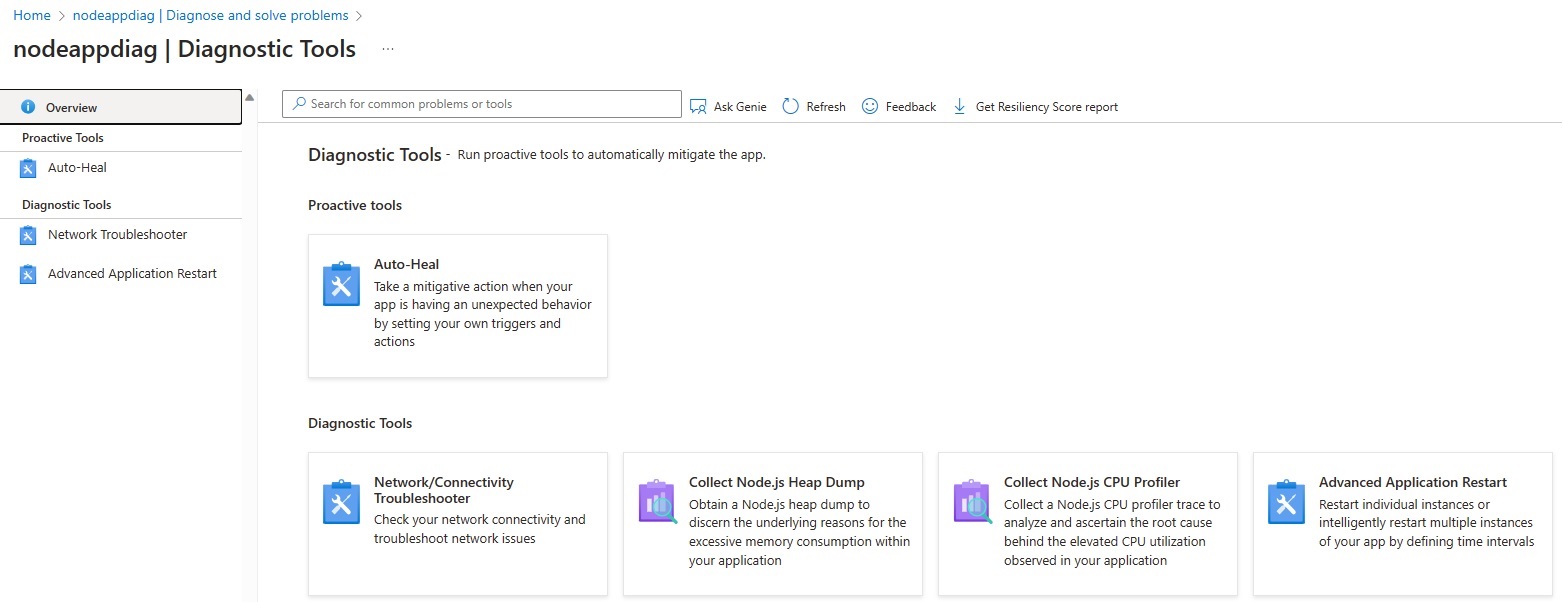
<h2 id="collection-in-diagnose-and-solve">Collection in Diagnose and Solve</h2>

<p>To access these new capabilities on your .NET Core apps hosted in Linux, navigate to the <strong>Diagnose and Solve</strong> Blade &gt; <strong>Diagnostics Tools</strong> and select either <strong>Collect Node Heap Dump</strong> or <strong>Collect Node CPU Profiler</strong>.</p>

<p><img src="/media/2024/01/node-diagnostics.jpg" alt="Linux Diagnostic Tools" /></p>

<h2 id="collection-in-kudu">Collection in Kudu</h2>

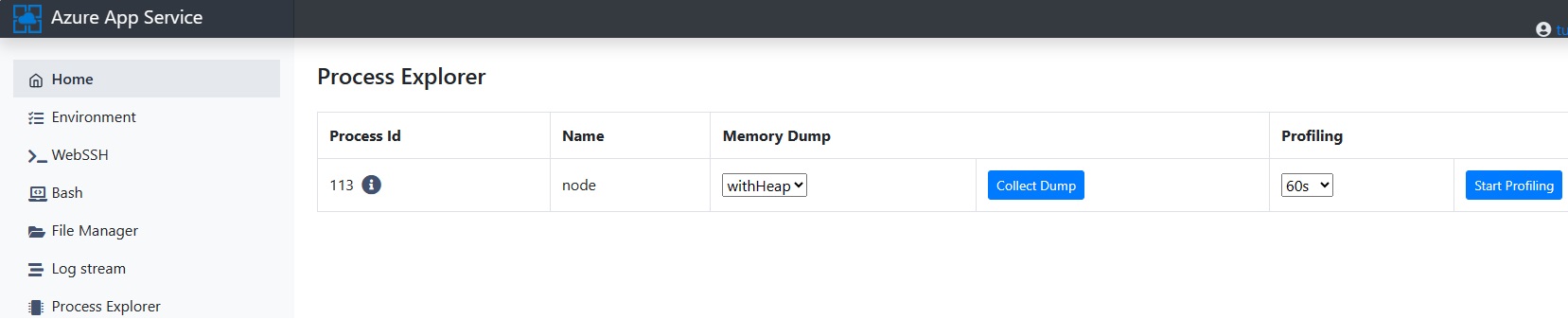
<p>The <a href="https://docs.microsoft.com/azure/app-service/resources-kudu">Kudu console</a> for Linux app services has been updated to include new collection options for memory dumps and profiles on the Process Explorer page.</p>

<p>To navigate to this new Kudu experience use the following (update &lt;<strong>mysite</strong>&gt; with your app name): https://&lt;<strong>mysite</strong>&gt;.scm.azurewebsites.net/<strong>newui</strong> to check out the new experience.</p>

<p><img src="/media/2024/01/node-process-explorer.jpg" alt="Process Explorer in Kudu" /></p>

<p>When you select the <em>Process Explorer</em> page, you can identify the process you want to debug. Use the drop-downs to select the type of memory dump and click <strong>Collect Dump</strong>. Alternatively, you can select the length of a profile from the drop-down and click <strong>Start Profiling</strong>.</p>

<h2 id="analyzing-a-heapsnapshot-for-memory-issues">Analyzing a heapsnapshot for Memory Issues</h2>

<p>Heap dumps are created using the extension *.heapsnapshot. Once the dump has been created, you will get a link to download it on your local machine. You can analyze the dump using any Chromium browser.</p>

<p>Since Chrome and Edge use the same Javascript runtime (V8 engine), heap snapshots can be read using Chrome or Edge DevTools for Node.<br />
<strong>Chrome</strong>: Navigate in Chrome Browser and type <code class="language-plaintext highlighter-rouge">chrome://inspect/</code>, then click on <strong>Open dedicated DevTools for Node</strong><br />
<strong>Edge</strong>: Navigate in Chrome Browser and type <code class="language-plaintext highlighter-rouge">edge://inspect/</code>, then click on <strong>Open dedicated DevTools for Node</strong></p>

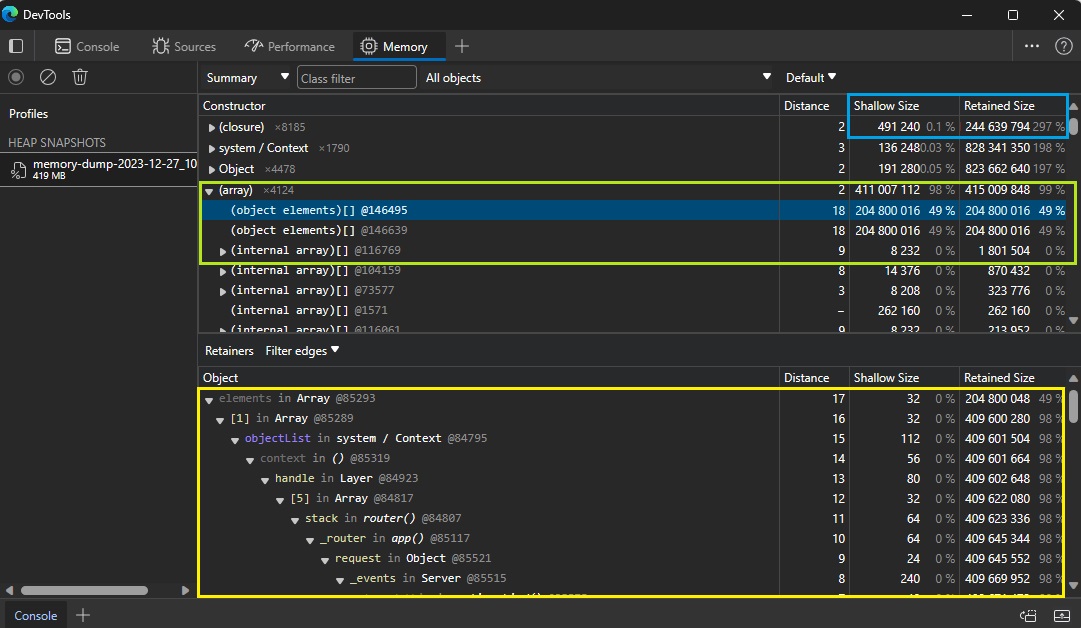
<p>You can chose the Memory tab and load a Heap Snapshot here for analysis. You will find several columns, the most important ones are <strong>Shallow Size</strong> and <strong>Retained Size</strong>.</p>

<blockquote>
  <p><strong>Shallow Size</strong>: This is the size of memory that is held by the object itself. Usually, only arrays and strings can have a significant shallow size.<br />
<strong>Retained Size</strong>: This is the size of memory that is freed once the object itself is deleted due it becoming unreachable from GC roots. Held by object implicitly.</p>
</blockquote>

<p>You will be looking for the highest percentage in Retained Size comparing as well with Shallow Size.</p>

<p><img src="/media/2024/01/heapsnapshot.jpg" alt="Heap snapshot" /></p>

<p>More information on how to analyze heapsnapshot dumps in Chromium browsers can be found here - <a href="https://developer.chrome.com/docs/devtools/memory-problems/heap-snapshots/">Chrome - Devtools - Heapsnapshot - Reference</a>.</p>

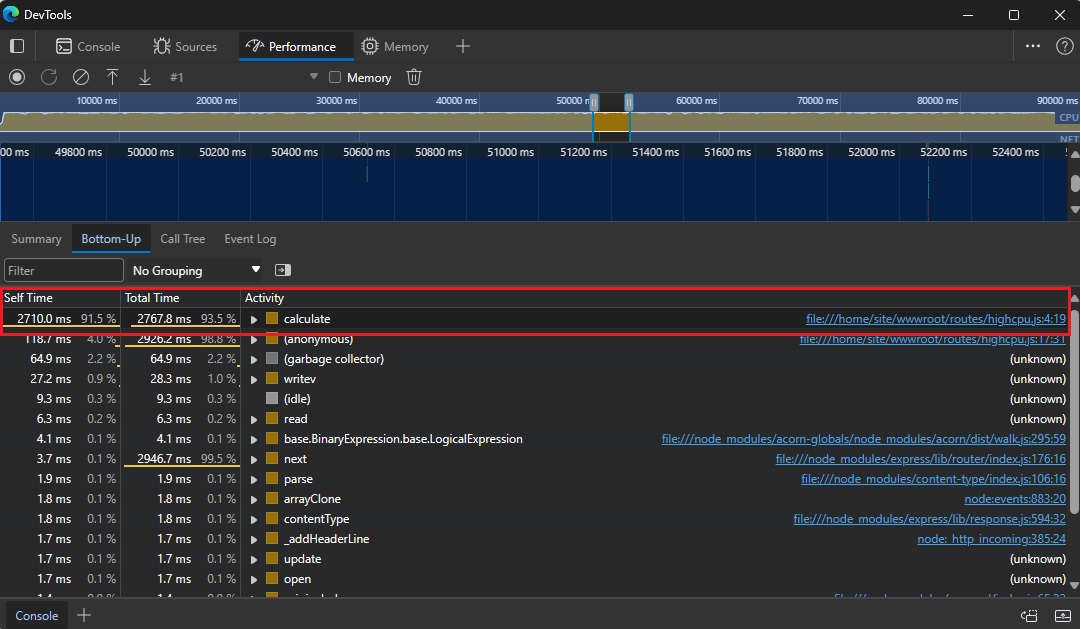
<h2 id="analyzing-a-cpuprofile-for-high-cpu-issues">Analyzing a cpuprofile for High CPU Issues</h2>

<p>Profiler traces are created using the extension *.cpuprofile. Once the trace has been created, you will get a link to download it on your local machine. You can analyze the trace using any Chromium browser.</p>

<p><strong>Chrome</strong>: Navigate in Chrome Browser and type <code class="language-plaintext highlighter-rouge">chrome://inspect/</code>, then click on <strong>Open dedicated DevTools for Node</strong><br />
<strong>Edge</strong>: Navigate in Chrome Browser and type <code class="language-plaintext highlighter-rouge">edge://inspect/</code>, then click on <strong>Open dedicated DevTools for Node</strong></p>

<p>Chose the Performance tab and you can drag and drop your trace here.</p>

<p><img src="/media/2024/01/node-cpu-profile.jpg" alt="CPU Profile" /></p>

<p>You can use different views like Call Tree or Bottom-Up. You can also zoom into any of the frames to get more detailed information.</p>

<h2 id="conclusion">Conclusion</h2>

<p>Summing up, within Azure App Service, we’re dedicated to consistently enhancing the in-built diagnostic experience, providing an extensive array of tools that empower you to meticulously analyze and troubleshoot the health of your production applications.</p>]]></content><author><name>Azure App Service</name></author><summary type="html"><![CDATA[We are pleased to announce the public availability of Diagnostic tools for App Services Linux for Node.js apps. With this capability, we now offer built-in support for collecting deep diagnostic artifacts that can help you debug application code issues. These artifacts include memory dumps and profiler traces. These tools empower developers to diagnose a variety of Node.js code scenarios on Linux including:]]></summary></entry><entry><title type="html">Node 20 and Python 3.12 now available on App Service</title><link href="https://azure.github.io/2023/11/14/Node-20-Python-312-available-on-app-service.html" rel="alternate" type="text/html" title="Node 20 and Python 3.12 now available on App Service" /><published>2023-11-14T00:00:00+00:00</published><updated>2023-11-14T00:00:00+00:00</updated><id>https://azure.github.io/2023/11/14/Node-20-Python-312-available-on-app-service</id><content type="html" xml:base="https://azure.github.io/2023/11/14/Node-20-Python-312-available-on-app-service.html"><![CDATA[<p>We are happy to announce that App Service now supports apps targeting <a href="https://nodejs.org/en/download/">Node 20</a> and <a href="https://www.python.org/downloads/">Python 3.12</a> across all public regions on Linux App Service Plans.</p>

<p>Want to get started with building apps on Node and Python? Follow these guides:</p>

<ol>
  <li><a href="https://learn.microsoft.com/azure/app-service/quickstart-nodejs?tabs=linux&amp;pivots=development-environment-cli">Create a Node.js web app in Azure</a></li>
  <li><a href="https://learn.microsoft.com/azure/app-service/tutorial-nodejs-mongodb-app">Deploy a Node.js + MongoDB web app to Azure</a></li>
  <li><a href="https://learn.microsoft.com/azure/app-service/quickstart-python">Quickstart: Deploy a Python (Django or Flask) web app to Azure App Service</a></li>
  <li><a href="https://learn.microsoft.com/azure/app-service/tutorial-python-postgresql-app">Deploy a Python (Django or Flask) web app with PostgreSQL in Azure</a></li>
</ol>

<p>We also rolled out support for <a href="https://aka.ms/appservice-dotnet8">.NET 8 GA on App Service</a></p>

<p>You can also checkout all the new Azure App Service features and capabilities that we are announcing at <a href="https://aka.ms/appserviceignite2023whatsnew">Ignite 2023</a></p>]]></content><author><name>Azure App Service</name></author><summary type="html"><![CDATA[We are happy to announce that App Service now supports apps targeting Node 20 and Python 3.12 across all public regions on Linux App Service Plans.]]></summary></entry><entry><title type="html">.NET 8 GA available on App Service</title><link href="https://azure.github.io/2023/11/14/dotnet8-ga.html" rel="alternate" type="text/html" title=".NET 8 GA available on App Service" /><published>2023-11-14T00:00:00+00:00</published><updated>2023-11-14T00:00:00+00:00</updated><id>https://azure.github.io/2023/11/14/dotnet8-ga</id><content type="html" xml:base="https://azure.github.io/2023/11/14/dotnet8-ga.html"><![CDATA[<p>We have completed the rollout for <a href="https://dotnet.microsoft.com/en-us/download/dotnet/8.0">.NET 8 GA</a> support on App Service.</p>

<p>Like in previous years we are using the <a href="https://aka.ms/app-service-early-access">App Service Early Access feature</a> to enable day-0 support on the platform across all public regions on Windows App Service Plans. The early access release will be followed by additional deployments to fully integrate the new bits across our fleet, expecting to be fully done by the end of the week.</p>

<p>On Linux App Service Plans, .NET 8 GA will be fully integrated on day-0 across all public regions without any additional deployments.</p>

<p>If you already have an app targeting and earlier preview of .NET 8.0 on the platform, there is no need to take action as the new runtime will be picked up on the next application restart once the update is available for your app. You can trigger this manually by starting and stopping your app.</p>

<p>Self-contained .NET apps will <em>not</em> be auto-updated since they have no dependency on the runtime provided by App Service.</p>

<p><a href="https://aka.ms/af-dotnet-isolated-net8">Azure Functions</a> and <a href="https://aka.ms/swa-dotnet8">Azure Static Webapps</a> are also enabling .NET 8 workloads across their scenarios.</p>

<p>If you want to learn more, be sure to checkout our sessions during <a href="https://www.dotnetconf.net/agenda">.NET Conf 2023</a>:</p>

<ul>
  <li>Tuesday 11/14 @ 4:30PM PST Join <a href="https://twitter.com/coolcsh">Scott Hunter</a> to talk about “Building and scaling cloud-native, intelligent applications on Azure and .NET”</li>
  <li>Wednesday 11/15 @ 10:00am PST Join <a href="https://twitter.com/bktv99">Byron Tardif</a> will be taking the stage talk about  “App Service the best place to host your .NET 8 Web Apps”.</li>
  <li>Thursday 11/16 @ 3:30PM PST Join <a href="https://twitter.com/segaurav">Gaurav Seth</a> will show you how to migrate your apps to Azure App Service in the session “From Zero to Hero: Quickly Migrate Web Apps with Azure App Service”</li>
</ul>

<p>You can also checkout all the new Azure App Service features and capabilities that we are announcing at <a href="https://aka.ms/appserviceignite2023whatsnew">Ignite 2023</a></p>

<p>Next steps:</p>

<ul>
  <li><a href="https://dotnet.microsoft.com/en-us/download/dotnet/8.0">Download .NET 8</a></li>
  <li><a href="https://aka.ms/dotnet8blog">Anouncing .NET 8.0 </a></li>
  <li><a href="https://aka.ms/aspnet-blog-8">ASP.NET Core in .NET 8</a></li>
  <li><a href="https://docs.microsoft.com/azure/app-service/quickstart-dotnetcore?tabs=net60&amp;pivots=development-environment-vs">Deploy a .NET application to App Service</a></li>
</ul>

<p>You can also follow us on twitter for more updates and news: <a href="https://twitter.com/AzAppService/">@AzAppService</a></p>]]></content><author><name>Azure App Service</name></author><summary type="html"><![CDATA[We have completed the rollout for .NET 8 GA support on App Service.]]></summary></entry><entry><title type="html">Recently Announced: Advanced Clustering Features for JBoss EAP on Azure App Service</title><link href="https://azure.github.io/2023/09/28/JBoss-EAP-Clustering-on-Azure-App-Service.html" rel="alternate" type="text/html" title="Recently Announced: Advanced Clustering Features for JBoss EAP on Azure App Service" /><published>2023-09-28T00:00:00+00:00</published><updated>2023-09-28T00:00:00+00:00</updated><id>https://azure.github.io/2023/09/28/JBoss-EAP-Clustering-on-Azure-App-Service</id><content type="html" xml:base="https://azure.github.io/2023/09/28/JBoss-EAP-Clustering-on-Azure-App-Service.html"><![CDATA[<h2 id="a-new-era-of-high-availability-and-scalability">A new era of high availability and scalability</h2>

<p>If you’re running distributed applications on <a href="https://learn.microsoft.com/en-us/azure/developer/java/ee/jboss-on-azure">JBoss EAP</a>, you know that clustering is essential for data consistency and fault tolerance. We’ve taken this a step further on <a href="https://azure.microsoft.com/en-us/products/app-service/">Azure App Service</a>. Now, when you integrate JBoss EAP with an <a href="https://learn.microsoft.com/en-us/azure/virtual-network/">Azure Virtual Network (VNet)</a>, clustering isn’t just an option; it’s a built-in feature that kicks in automatically.</p>

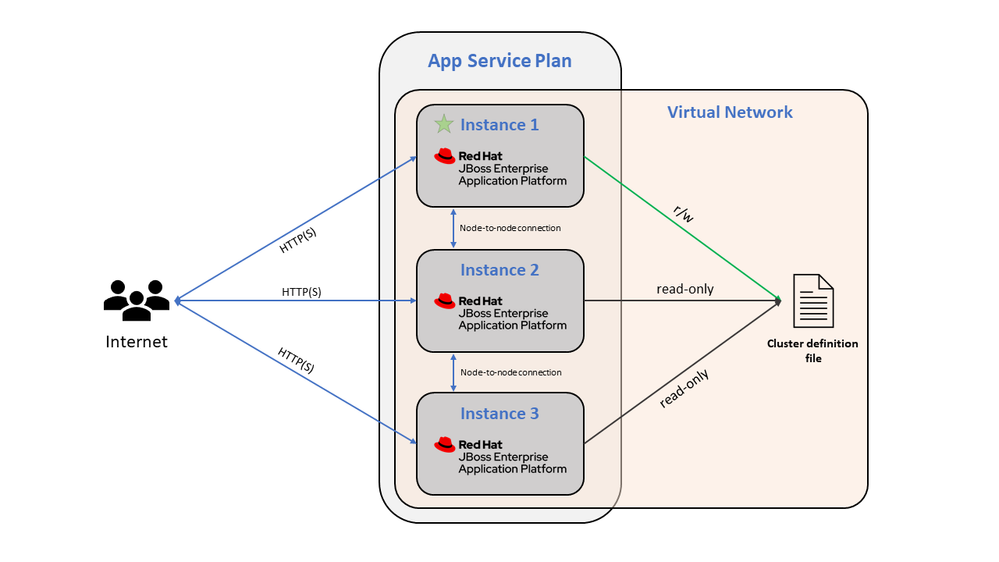
<p>What does this mean for your apps? For starters, it improves fault tolerance and enables more efficient data sharing across multiple instances. Your application can now handle traffic spikes and server failures better. The service scales based on your configured settings in Azure App Service, providing both vertical and horizontal options.</p>

<p>One key update in this release is the automatic enablement of clustering when you activate VNet Integration for your web application. This results in a high-availability setup right from the get-go. We’ll delve into the technical specifics below.</p>

<p><img src="/media/2023/09/jboss-clustering.png" alt="JBOSS Clustering on App Service Architecture" /></p>

<p>Enabling VNet integration is required for communication between servers that form the cluster. Clustering is enabled automatically but can be disabled using an Application Setting (WEBSITE_DISABLE_CLUSTERING).</p>

<h2 id="whats-included">What’s Included</h2>

<ul>
  <li>Clustering of web applications, including HTTP session replication, HA (high availability), and Singleton Service. For more information, see <a href="https://access.redhat.com/documentation/en-us/red_hat_jboss_enterprise_application_platform/7.4/html/development_guide/clustering_in_web_applications">Chapter 6. Clustering in Web Applications - Red Hat Customer Portal</a></li>
  <li>High-availability support</li>
  <li>Transaction recovery support</li>
</ul>

<h2 id="configuration">Configuration</h2>
<p>You can configure the behavior of the clustering-related features using these Application Settings:</p>

<ul>
  <li>
    <p>WEBSITE_JBOSS_SERVER_DIR defines the parent location of the JBoss state and transaction files. If customers use a location mounted from Azure Storage, this setting improves the availability of the application by avoiding using the /home directory, which becomes read-only during platform upgrades.</p>
  </li>
  <li>
    <p>WEBSITE_JBOSS_CLUSTER_DIR defines the location of the cluster definition files. Similar to the previous setting, if you use a location mounted from Azure Storage, this setting improves the availability of the application by avoiding using the /home directory which becomes read-only during platform upgrades.</p>
  </li>
  <li>
    <p>JBOSS_LAUNCHER_OPTS passes options directly to the JBoss launcher script (standalone.sh) to allow changes such as enabling the JBoss web administration interface.</p>
  </li>
  <li>
    <p>WEBSITE_DISABLE_CLUSTERING prevents the clustering behavior from starting, even if the application is used with VNet integration enabled.</p>
  </li>
  <li>
    <p>WEBSITES_CONTAINER_STOP_TIME_LIMIT sets how long to wait for pending transactions before stopping the server forcefully (in seconds). Its default value is 120 seconds.</p>
  </li>
</ul>

<h2 id="how-to-get-started">How to Get Started</h2>

<p>Get started with Clustering Support on App Service for JBOSS EAP today! It is now generally available. To get your hands on it, go through our detailed guide: <a href="https://github.com/Azure-Samples/clustered-jboss-demo">Clustered JBoss EAP on Azure App Service Quickstart</a>. This guide walks you through the deployment of a basic distributed application to JBoss EAP, demonstrating how clustering operates seamlessly on Azure App Service.</p>

<h2 id="additional-information">Additional Information</h2>

<h3 id="auto-scale-rules">Auto-scale rules</h3>

<p>When configuring auto-scale rules for horizontal scaling it is important to remove instances one at a time to ensure each removed instance transfers its activity (for example, handling a database transaction) to another member of the cluster. When configuring your auto-scale rules in the Portal to scale down, use the following options:</p>

<ul>
  <li>
    <p>Operation: “Decrease count by”</p>
  </li>
  <li>
    <p>Cool down: “5 minutes” or greater</p>
  </li>
  <li>
    <p>Instance count: 1</p>
  </li>
</ul>

<p>When scaling out though, you can add multiple instances to the cluster simultaneously.</p>

<h3 id="limitations-on-clustering">Limitations on Clustering</h3>

<ul>
  <li>
    <p>The App Service platform waits up to 120 seconds before stopping a server, not indefinitely for transactions to complete. Any pending transactions remaining after stopping the server are recovered when a new server is added, according to the number of instances defined in the Scale Out configuration.</p>
  </li>
  <li>
    <p>If a customer manually resizes down a cluster, there’s a potential for nodes to be stopped before they complete their transactions. In that case a warning is emitted, and manual intervention is needed to commit the transactions from that node. The process is documented in section 5.2. “Migrating Logs to a New JBoss EAP Server” of the guide <a href="https://access.redhat.com/documentation/en-us/red_hat_jboss_enterprise_application_platform/7.4/html-single/managing_transactions_on_jboss_eap/index#migrating_logs_to_new_server">Managing Transactions - Red Hat Customer Portal</a>.</p>
  </li>
  <li>
    <p>In the case of a movement to different hardware (for example, scaling up or hardware faults), when a cluster node cannot complete its transactions, a warning will be emitted, and manual intervention is needed to commit any transactions that were not committed.</p>
  </li>
</ul>

<h3 id="learn-more">Learn more</h3>

<ul>
  <li>
    <p><a href="https://www.redhat.com/en/about/press-releases/red-hat-expands-capabilities-jboss-enterprise-application-platform-offerings-microsoft-azure">Red Hat Expands Capabilities of JBoss Enterprise Application Platform Offerings on Microsoft Azure</a></p>
  </li>
  <li>
    <p><a href="https://github.com/Azure-Samples/clustered-jboss-demo">Clustered JBoss EAP on Azure App Service Quickstart</a></p>
  </li>
  <li>
    <p><a href="https://learn.microsoft.com/en-us/azure/developer/java/ee/jboss-on-azure#jboss-eap-on-azure-app-service">JBoss EAP on Azure App Service</a></p>
  </li>
  <li>
    <p><a href="https://access.redhat.com/documentation/en-us/red_hat_jboss_enterprise_application_platform/7.4/html/development_guide/clustering_in_web_applications">Clustering in Web Applications - Red Hat Customer Portal</a></p>
  </li>
  <li>
    <p><a href="https://techcommunity.microsoft.com/t5/apps-on-azure-blog/recently-announced-advanced-clustering-features-for-jboss-eap-on/ba-p/3939672">Recently Announced: Advanced Clustering Features for JBoss EAP on Azure App Service</a></p>
  </li>
</ul>]]></content><author><name>Azure App Service</name></author><summary type="html"><![CDATA[A new era of high availability and scalability]]></summary></entry><entry><title type="html">.Net 8 Preview 7 now available on App Service</title><link href="https://azure.github.io/2023/09/22/net-8-preview-7-available-on-app-service.html" rel="alternate" type="text/html" title=".Net 8 Preview 7 now available on App Service" /><published>2023-09-22T00:00:00+00:00</published><updated>2023-09-22T00:00:00+00:00</updated><id>https://azure.github.io/2023/09/22/net-8-preview-7-available-on-app-service</id><content type="html" xml:base="https://azure.github.io/2023/09/22/net-8-preview-7-available-on-app-service.html"><![CDATA[<p>We are happy to announce that App Service now supports apps targeting <a href="https://dotnet.microsoft.com/en-us/download/dotnet/8.0">.Net 8 Preview 7</a> across all public regions on Azure App Service. It is available for both Windows and Linux App Service Plans.</p>

<p>Want to get started with .Net 8? Follow these:</p>

<ol>
  <li><a href="https://devblogs.microsoft.com/dotnet/announcing-dotnet-8-preview-7/">Learn more about .Net 8 Preview 7</a></li>
  <li><a href="https://devblogs.microsoft.com/dotnet/asp-net-core-updates-in-dotnet-8-preview-7/">ASP.Net Core in .Net 8</a></li>
  <li><a href="https://dotnet.microsoft.com/en-us/download/dotnet/8.0">Download .Net 8 Preview 7</a></li>
  <li><a href="https://docs.microsoft.com/azure/app-service/quickstart-dotnetcore?tabs=net60&amp;pivots=development-environment-vs">Deploy a .Net app to App Service</a></li>
</ol>

<p>You can also follow us on twitter for more updates and news: <a href="https://twitter.com/AzAppService/">@AzAppService</a></p>]]></content><author><name>Azure App Service</name></author><summary type="html"><![CDATA[We are happy to announce that App Service now supports apps targeting .Net 8 Preview 7 across all public regions on Azure App Service. It is available for both Windows and Linux App Service Plans.]]></summary></entry><entry><title type="html">Announcing Public Preview of Free Hosting Plan for WordPress on App Service</title><link href="https://azure.github.io/2023/09/05/WordPress-Free-Hosting-Plan-Public-Preview.html" rel="alternate" type="text/html" title="Announcing Public Preview of Free Hosting Plan for WordPress on App Service" /><published>2023-09-05T00:00:00+00:00</published><updated>2023-09-05T00:00:00+00:00</updated><id>https://azure.github.io/2023/09/05/WordPress%20Free%20Hosting%20Plan%20Public%20Preview</id><content type="html" xml:base="https://azure.github.io/2023/09/05/WordPress-Free-Hosting-Plan-Public-Preview.html"><![CDATA[<p>We are excited to announce that we have released the public preview of free hosting plan for WordPress on App Service.</p>

<p>We announced the General Availability of WordPress on App Service one year ago, in August 2022 with 3 paid hosting plans. We learnt that sometimes you might need to try out the service before you migrate your production applications. So, we are offering you a playground for a limited period - a free hosting plan to and explore and experiment with WordPress on App Service. This will help you understand the offering better before you make a long-term investment.</p>

<table>
  <tbody>
    <tr>
      <td><strong>Note</strong>: This hosting plan is not suitable for Production workloads. So, it is highly recommended that you do not use this plan for production setup.</td>
    </tr>
  </tbody>
</table>

<p><strong>Updated Hosting Plans:</strong></p>

<table>
  <thead>
    <tr>
      <th><strong>Hosting Plan</strong></th>
      <th><strong>WebApp Server</strong></th>
      <th><strong>Database Server</strong></th>
    </tr>
  </thead>
  <tbody>
    <tr>
      <td>Free</td>
      <td>F1 Free Tier (60 CPU minutes per day, 1 GB RAM, 1 GB Storage)</td>
      <td>Burstable, B1ms Free trial (1 vCores, 2 GB RAM, 32 GB storage, 396 IOPS)</td>
    </tr>
    <tr>
      <td>Basic</td>
      <td>B1 (1 vCores, 1.75 GB RAM, 10 GB Storage)</td>
      <td>Burstable, B1s (1 vCores, 1 GB RAM, 20 GB storage, Auto IOPS)</td>
    </tr>
    <tr>
      <td>Standard</td>
      <td>P1V2 (1 vCores, 3.5 GB RAM, 250 GB Storage)</td>
      <td>Burstable, B2s (2 vCores, 4 GB RAM, 128 GB storage, Auto IOPS)</td>
    </tr>
    <tr>
      <td>Premium</td>
      <td>P1V3 (2 vCores, 8 GB RAM, 250 GB Storage)</td>
      <td>General Purpose, D2ds_v4 (2 vCores, 16 GB RAM, 256 GB storage, Auto IOPS)</td>
    </tr>
  </tbody>
</table>

<p><strong>Eligibility</strong>:</p>

<p>The free hosting plan take advantage of App Service F1 free tier and Azure Database for MySQL free trial. Your eligibility depends on your subscription type:</p>

<table>
  <thead>
    <tr>
      <th><strong>Subscription Type</strong></th>
      <th><strong>App Service F1</strong></th>
      <th><strong>Azure Database for MySQL B1ms</strong></th>
    </tr>
  </thead>
  <tbody>
    <tr>
      <td>Free Account</td>
      <td>Free Forever</td>
      <td>750 hours per month for 12 months</td>
    </tr>
    <tr>
      <td>Student Account</td>
      <td>Free Forever</td>
      <td>750 hours per month for 12 months</td>
    </tr>
    <tr>
      <td>Pay as you go with Free MySQL</td>
      <td>Free Forever</td>
      <td>750 hours per month for 12 months</td>
    </tr>
    <tr>
      <td>Pay as you go without Free MySQL</td>
      <td>Free Forever</td>
      <td>Chargeable</td>
    </tr>
  </tbody>
</table>

<p>Note: Please refer to this FAQ for more details on Free Account : <a href="https://azure.microsoft.com/free/free-account-faq">Azure Free Account FAQ | Microsoft Azure</a></p>

<p><strong>Features and Limitations</strong>:</p>

<p>The free hosting plan takes advantage of multiple optimizations and features we built for WordPress on App Service on top of the inbuilt features for App Service and Azure Database for MySQL.</p>

<ol>
  <li>Easy and Automated deployments from the Azure Portal</li>
  <li>Inbuilt Redis cache</li>
  <li>Accelerated WP Admin using local storage caching</li>
  <li>PhpMyAdmin for database management</li>
</ol>

<p>However, there are certain points that you need to keep in mind.</p>

<ol>
  <li>App Service F1 plan has limited capabilities compared to shared to Basic or Standard plans. Read <a href="https://learn.microsoft.com/en-in/azure/azure-resource-manager/management/azure-subscription-service-limits#app-service-limits">Azure App Service Plans | Microsoft Learn</a></li>
  <li>Azure Database for MySQL has 750 hours of Burstable B1ms instance for this free hosting plan. Read <a href="https://learn.microsoft.com/en-us/azure/mysql/flexible-server/how-to-deploy-on-azure-free-account">Azure Database for MySQL Free Trial | Microsoft Learn</a></li>
  <li>Integration with Paid services such as CDN, Front Door, Blob Storage, and Email Service is not included in the free hosting plan.</li>
  <li>Local storage caching is limited to 500 MB. We recommend that you do not exceed 500 MB in content, themes, and plugins.</li>
</ol>

<p>Limitations:</p>

<ol>
  <li>Since you are running on Free Tier, for App Service there is no support for Scale out capability and ‘Always on’ feature. They are disabled for F1 SKU.</li>
  <li>There is no VNET support, hence you cannot configure your WordPress site which is on Free trial within a VNET. However to secure your data, you can configure the database behind the private end point. Details on how to configure with private end point can be found here: <a href="https://learn.microsoft.com/azure/mysql/flexible-server/how-to-deploy-on-azure-free-account">Use an Azure free account to try Azure Database for MySQL - Flexible Server for free | Microsoft Learn</a></li>
</ol>

<p><strong>Upgrading to higher SKUs</strong>:</p>

<p>When running on Azure App Service F1 SKU, it is not supported to scale-out to multiple instances.  You can scale-up your App Service to next highest SKU that suits your workloads. Upgrade your WordPress site to higher SKUs based on your workloads. You can refer to the guidance described here: <a href="https://techcommunity.microsoft.com/t5/apps-on-azure-blog/price-reduction-in-hosting-plans-for-wordpress-on-azure-app/ba-p/3786290">Price reduction in Hosting Plans for WordPress on Azure App Service - Microsoft Community Hub</a></p>

<p><strong>Monitor and track free service usage</strong>:</p>

<p>You’re not charged for Azure App Service F1 SKU as this SKU is forever free. You’re not charged for Azure Database for MySQL - Flexible Server services included for free with your Azure free account unless you exceed the free service limits. To remain within the limits, use the Azure portal to track and monitor your free services usage.  For tracking and monitoring your free services usage, refer to this document: <a href="https://learn.microsoft.com/azure/cost-management-billing/manage/check-free-service-usage">Monitor and track Azure free service usage - Microsoft Cost Management | Microsoft Learn</a></p>

<p><strong>Additional references</strong>:</p>

<ol>
  <li>How to create student account for College students/teachers/profressors: <a href="https://azure.microsoft.com/free/students/">Azure for Students – Free Account Credit | Microsoft Azure</a></li>
  <li>How to create Azure Free account: <a href="https://azure.microsoft.com/free">Create Your Azure Free Account Today | Microsoft Azure</a></li>
</ol>

<p><strong>Support and Feedback</strong>:</p>

<p>In case you need any support, you can open a support request at <a href="https://ms.portal.azure.com/#view/Microsoft_Azure_Support/NewSupportRequestV3Blade">New support request - Microsoft Azure</a>.  </p>

<p>For more details about the offering, please visit  <a href="https://github.com/Azure/wordpress-linux-appservice">Azure/wordpress-linux-appservice (github.com)</a>  </p>

<p>If you have any ideas about how we can make WordPress on Azure App Service better, please post your ideas at <a href="https://feedback.azure.com/d365community/post/b09330d1-c625-ec11-b6e6-000d3a4f0f1c?page=1&amp;sort=newest">Post idea · Community (azure.com)</a> or report an issue at <a href="https://github.com/Azure/wordpress-linux-appservice/issues">Issues · Azure/wordpress-linux-appservice (github.com)</a></p>

<p>or you could email us at <a href="mailto:wordpressonazure@microsoft.com">wordpressonazure@microsoft.com</a> to start a conversation.</p>]]></content><author><name>Azure App Service</name></author><summary type="html"><![CDATA[We are excited to announce that we have released the public preview of free hosting plan for WordPress on App Service.]]></summary></entry><entry><title type="html">.Net 8 Preview 7 now available on App Service</title><link href="https://azure.github.io/2023/09/01/.Net-8-Preview-7-available-on-AppService.html" rel="alternate" type="text/html" title=".Net 8 Preview 7 now available on App Service" /><published>2023-09-01T00:00:00+00:00</published><updated>2023-09-01T00:00:00+00:00</updated><id>https://azure.github.io/2023/09/01/.Net-8-Preview-7-available-on-AppService</id><content type="html" xml:base="https://azure.github.io/2023/09/01/.Net-8-Preview-7-available-on-AppService.html"><![CDATA[<p>We are happy to announce that App Service now supports apps targeting <a href="https://dotnet.microsoft.com/en-us/download/dotnet/8.0">.Net 8 Preview 7</a> across all public regions on Linux App Service Plans.</p>

<p>In the coming weeks, as our deployment progresses, .Net 8 Preview 7 would also be available on Windows App Service Plans.</p>

<p>Want to get started with .Net 8? Follow these:</p>

<ol>
  <li><a href="https://devblogs.microsoft.com/dotnet/announcing-dotnet-8-preview-7/">Learn more about .Net 8 Preview 7</a></li>
  <li><a href="https://devblogs.microsoft.com/dotnet/asp-net-core-updates-in-dotnet-8-preview-7/">ASP.Net Core in .Net 8</a></li>
  <li><a href="https://dotnet.microsoft.com/en-us/download/dotnet/8.0">Download .Net 8 Preview 7</a></li>
  <li><a href="https://docs.microsoft.com/azure/app-service/quickstart-dotnetcore?tabs=net60&amp;pivots=development-environment-vs">Deploy a .Net app to App Service</a></li>
</ol>

<p>You can also follow us on twitter for more updates and news: <a href="https://twitter.com/AzAppService/">@AzAppService</a></p>]]></content><author><name>Azure App Service</name></author><summary type="html"><![CDATA[We are happy to announce that App Service now supports apps targeting .Net 8 Preview 7 across all public regions on Linux App Service Plans.]]></summary></entry><entry><title type="html">Updates to App Service Azure Policies that monitor language versions</title><link href="https://azure.github.io/2023/04/24/App-service-language-version-policy-update.html" rel="alternate" type="text/html" title="Updates to App Service Azure Policies that monitor language versions" /><published>2023-04-24T00:00:00+00:00</published><updated>2023-04-24T00:00:00+00:00</updated><id>https://azure.github.io/2023/04/24/App-service-language-version-policy-update</id><content type="html" xml:base="https://azure.github.io/2023/04/24/App-service-language-version-policy-update.html"><![CDATA[<p><a href="https://learn.microsoft.com/azure/governance/policy/overview">Azure Policy</a> for App Service has the following built-in policies that ensure you are using the latest versions of certain languages that are available on the platform.</p>

<ol>
  <li><strong>App Service apps that use Java should use the latest ‘Java version’</strong></li>
  <li><strong>App Service apps that use Python should use the latest ‘Python version’</strong></li>
  <li><strong>App Service apps that use PHP should use the latest ‘PHP version’</strong></li>
  <li><strong>Function apps that use Java should use the latest ‘Java version’</strong></li>
  <li><strong>Function apps that use Python should use the latest ‘Python version’</strong></li>
</ol>

<h2 id="updates">Updates</h2>

<p>We know that for certain customers, using the latest version of a language or runtime isn’t always possible. Additionally, with the variations and possible language versions available, we want to provide a way for our customers to have more flexibility when monitoring the compliance of languages used by their apps. For these reasons, the above policies have been modified. The following changes have been implemented and will be visible in the Azure portal in the next few weeks.</p>

<ol>
  <li>The policies no longer have a hard-coded value for the language version they’re monitoring. Instead, the user must specify a version that aligns with their requirements when assigning these policies.
    <ol>
      <li>When assigning these policies, users will be prompted to specify a language version.</li>
    </ol>
  </li>
  <li>The policies have been renamed to align with this updated scope. Below are the new names.
    <ol>
      <li><strong>App Service apps that use Java should use a specified ‘Java version’</strong></li>
      <li><strong>App Service apps that use Python should use a specified ‘Python version’</strong></li>
      <li><strong>App Service apps that use PHP should use a specified ‘PHP version’</strong></li>
      <li><strong>Function apps that use Java should use a specified ‘Java version’</strong></li>
      <li><strong>Function apps that use Python should use a specified ‘Python version’</strong></li>
    </ol>
  </li>
  <li>The policies have been removed from the Azure Security Baseline and Microsoft Defender for Cloud initiatives.
    <ol>
      <li>The policies can still be assigned and even added to a Microsoft Defender for Cloud initiative, however they won’t be automatically assigned as they previously were.</li>
    </ol>
  </li>
  <li>Equivalent policies have been created to monitor compliance for slots. These must be assigned in addition to the policies that monitor the main site in order to ensure monitoring is in place for all App Service resources.
    <ol>
      <li><strong>App Service app slots that use Python should use a specified ‘Python version’</strong></li>
      <li><strong>Function app slots that use Python should use a specified ‘Python version’</strong></li>
      <li><strong>App Service app slots that use PHP should use a specified ‘PHP version’</strong></li>
      <li><strong>App Service app slots that use Java should use a specified ‘Java version’</strong></li>
      <li><strong>Function app slots that use Java should use a specified ‘Java version’</strong></li>
    </ol>
  </li>
</ol>

<p>There are also a couple limitations to be aware of when using these policies.</p>

<ol>
  <li>They’re scoped to apps on Linux App Service only.
    <ol>
      <li>If you require monitoring for Windows apps, you can use the existing policies as a reference to create Windows specific custom policies. For more information on building and assigning custom policies, see <a href="https://learn.microsoft.com/azure/governance/policy/tutorials/create-custom-policy-definition">Tutorial: Create a custom policy definition</a>.</li>
    </ol>
  </li>
  <li>These policies use text based matching on a “free-text” field to monitor compliance. Ensure you have proper controls in place to prevent unexpected changes to language versions.</li>
</ol>

<h2 id="required-actions">Required actions</h2>

<p>These policy updates will have no impact on existing policy assignments. If you have the old version of these policies assigned, they will continue to function without interruption. In order to use the new versions of these policies, you must create new policy assignments. We encourage you to take this action as soon as possible as the old versions of these policies are prone to false negatives.</p>

<h2 id="how-to-use-the-new-policies">How to use the new policies</h2>

<p>The new policies can be assigned in the Azure portal. For more information on how to assign policies, see <a href="https://docs.microsoft.com/azure/governance/policy/assign-policy-portal">Assign a policy to a resource group</a>.</p>

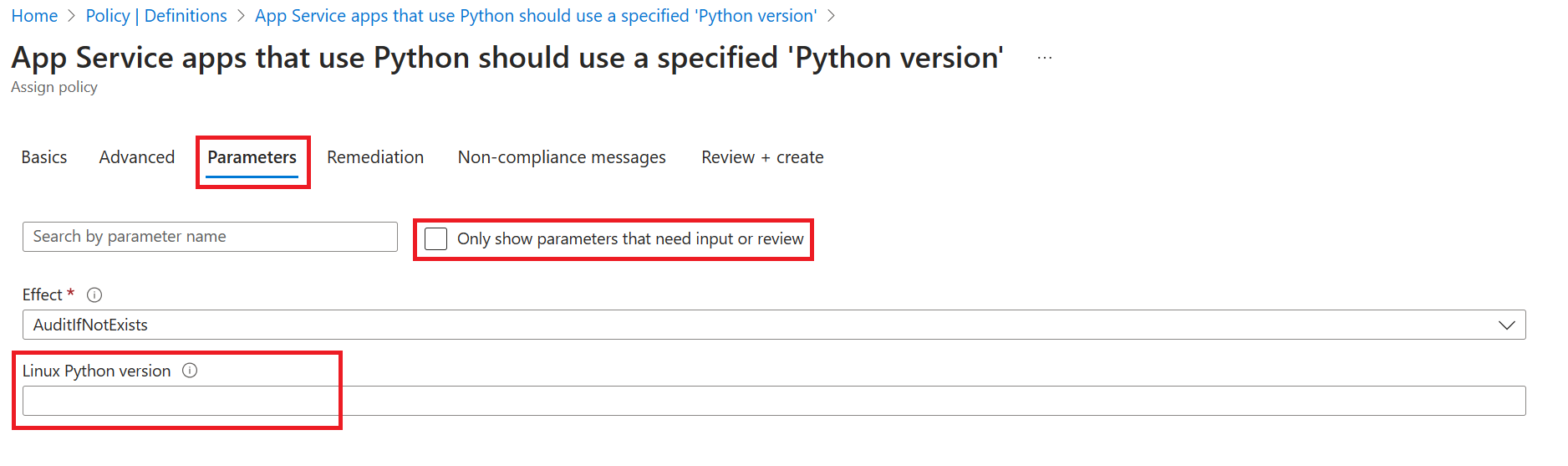
<p>When assigning these policies in the Azure portal, you won’t automatically be prompted to specify a language version. You must go to the Parameters tab and uncheck the box “Only show parameters that need input or review” in order to see the language version parameter. This is a required parameter that defaults to an empty string so if you don’t specify a value, the policy will always evaluate to non-compliant.</p>

<p><img src="/media/2023/04/parameter-specification.png" alt="" /></p>]]></content><author><name>Azure App Service</name></author><summary type="html"><![CDATA[Azure Policy for App Service has the following built-in policies that ensure you are using the latest versions of certain languages that are available on the platform.]]></summary></entry><entry><title type="html">Estimate your cost savings by migrating to App Service Environment v3</title><link href="https://azure.github.io/2023/03/02/App-service-environment-v3-pricing.html" rel="alternate" type="text/html" title="Estimate your cost savings by migrating to App Service Environment v3" /><published>2023-03-02T00:00:00+00:00</published><updated>2023-03-02T00:00:00+00:00</updated><id>https://azure.github.io/2023/03/02/App-service-environment-v3-pricing</id><content type="html" xml:base="https://azure.github.io/2023/03/02/App-service-environment-v3-pricing.html"><![CDATA[<p>If you weren’t already aware, App Service Environment v1 and v2 is <a href="https://azure.microsoft.com/updates/app-service-environment-version-1-and-version-2-will-be-retired-on-31-august-2024/">retiring on 31 August, 2024</a>. There are many reasons to <a href="https://aka.ms/asemigration">migrate to App Service Environment v3</a> including better performance, faster scaling, and reduced overhead since networking dependency management has been greatly simplified. One benefit that stands out that we understand might need some additional explanation is that App Service Environment v3 is often cheaper than previous versions. With the removal of the stamp fee and larger instance sizes per respective SKU with previous versions, App Service Environment v3 can help you do more with less and reduce your monthly spend if you’re familiar with the updates.</p>

<p>In this post, we’ll go over a couple common scenarios that will help you better understand App Service Environment v3 pricing and how it compares to your pricing model on App Service Environment v1 or v2. We know there are many scenarios out there, so hopefully one of the ones shared here can be used as an example for you to better understand your situation. <a href="https://azure.microsoft.com/pricing/calculator/">The Azure Pricing Calculator</a> is a great resource and will be referenced throughout this post for each scenario. Note that estimates here are based on the prices applicable on the day the estimate was created. Actual total estimates may vary. For the most up-to-date estimate, click the link for each scenario. Refer to the <a href="https://azure.microsoft.com/pricing/details/app-service/windows/">App Service pricing page</a> for more information.</p>

<blockquote>
  <p>NOTE: Unless otherwise indicated, all scenarios are calculated using costs based on Linux $USD pricing in East US. The payment option is set to monthly to simplify cost comparisons.</p>
</blockquote>

<h2 id="basic-scenarios">Basic scenarios</h2>

<h3 id="scenario-1-scale-down-your-app-service-plans-with-pay-as-you-go-pricing">Scenario 1: Scale down your App Service plans with pay-as-you-go pricing</h3>

<p>The App Service plan SKUs available for App Service Environment v3 run on the Isolated v2 tier. This is not to be confused with the tier used by App Service Environment v2, which is the Isolated tier. Below are the corresponding service plans for each available tier. Notice that for the Isolated v2 tier, the number of cores and amount of RAM is effectively doubled. We’ll use this information in this scenario. Additionally, there are <a href="https://azure.github.io/AppService/2022/12/01/Announcing-Larger-Isolatedv2-SKUs.html">new larger SKUs available with the Isolated v2 tier</a> that were not previously available with the older version.</p>

<table>
  <thead>
    <tr>
      <th style="text-align: center">Isolated</th>
      <th style="text-align: center">Cores</th>
      <th style="text-align: center">RAM (GB)</th>
      <th style="text-align: center"> </th>
      <th style="text-align: center">Isolated v2</th>
      <th style="text-align: center">Cores</th>
      <th style="text-align: center">RAM (GB)</th>
    </tr>
  </thead>
  <tbody>
    <tr>
      <td style="text-align: center">I1</td>
      <td style="text-align: center">1</td>
      <td style="text-align: center">3.5</td>
      <td style="text-align: center">→</td>
      <td style="text-align: center">I1v2</td>
      <td style="text-align: center">2</td>
      <td style="text-align: center">8</td>
    </tr>
    <tr>
      <td style="text-align: center">I2</td>
      <td style="text-align: center">2</td>
      <td style="text-align: center">7</td>
      <td style="text-align: center">→</td>
      <td style="text-align: center">I2v2</td>
      <td style="text-align: center">4</td>
      <td style="text-align: center">16</td>
    </tr>
    <tr>
      <td style="text-align: center">I3</td>
      <td style="text-align: center">4</td>
      <td style="text-align: center">14</td>
      <td style="text-align: center">→</td>
      <td style="text-align: center">I3v2</td>
      <td style="text-align: center">8</td>
      <td style="text-align: center">32</td>
    </tr>
    <tr>
      <td style="text-align: center"> </td>
      <td style="text-align: center"> </td>
      <td style="text-align: center"> </td>
      <td style="text-align: center"> </td>
      <td style="text-align: center">I4v2</td>
      <td style="text-align: center">16</td>
      <td style="text-align: center">64</td>
    </tr>
    <tr>
      <td style="text-align: center"> </td>
      <td style="text-align: center"> </td>
      <td style="text-align: center"> </td>
      <td style="text-align: center"> </td>
      <td style="text-align: center">I5v2</td>
      <td style="text-align: center">32</td>
      <td style="text-align: center">128</td>
    </tr>
    <tr>
      <td style="text-align: center"> </td>
      <td style="text-align: center"> </td>
      <td style="text-align: center"> </td>
      <td style="text-align: center"> </td>
      <td style="text-align: center">I6v2</td>
      <td style="text-align: center">64</td>
      <td style="text-align: center">256</td>
    </tr>
  </tbody>
</table>

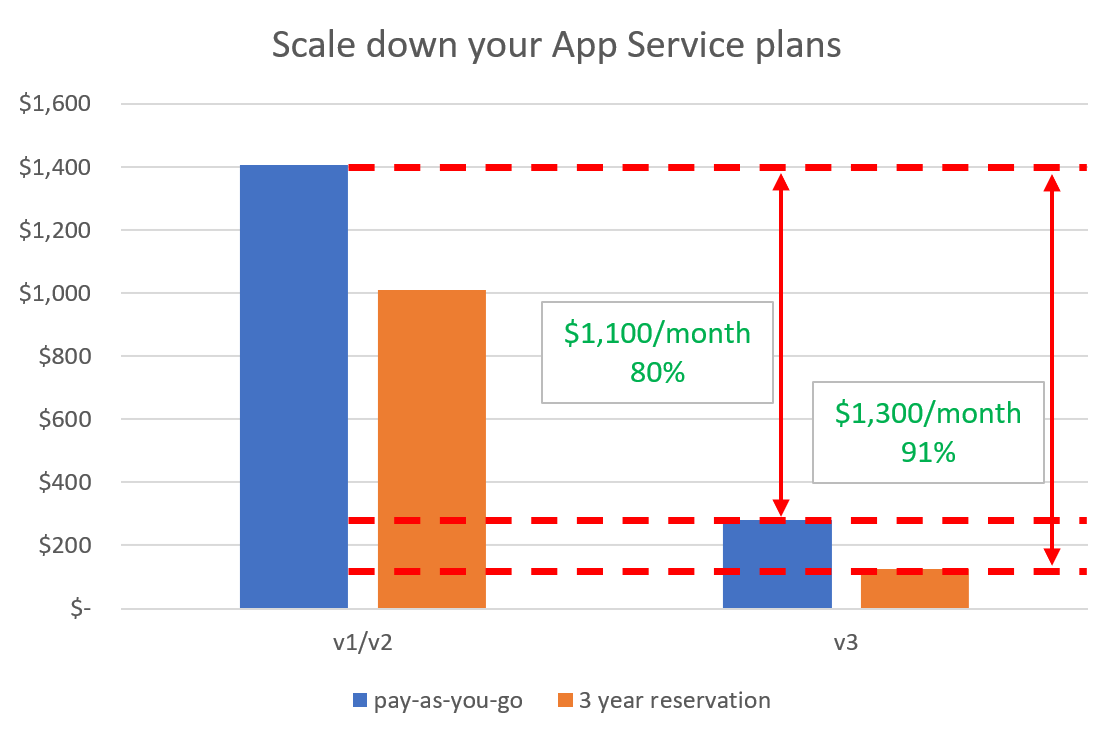
<p>In this scenario, you are using an App Service Environment v2 with 1 I2 plan. You require 2 cores and 7 GB RAM. You are using pay-as-you-go pricing.</p>

<p>On App Service Environment v2, your monthly cost is:</p>

<p><a href="https://azure.com/e/45f5b42a6f144e448fd78e93afa77e6f">Stamp fee + 1(I2) = $991.34 + $416.10 = <strong>$1,407.44</strong></a></p>

<p>If you were to migrate this exact workload to App Service Environment v3, you would be able to scale down from I2 to I1v2 since the Isolated v2 equivalent tier has double the cores and RAM. Your monthly cost on App Service Environment v3 would be:</p>

<p><a href="https://azure.com/e/e88da9f9cacb4e3ab0a0179f7521f316">1(I1v2) = <strong>$281.78</strong></a></p>

<p>As you can see, this is a significant cost savings since you were able to use a smaller tier and the stamp fee is no longer applicable. If you don’t scale down after migrating to v3, you will be over-provisioned and incur unnecessary charges, some of which may make your App Service Environment v3 more expensive than your old environment.</p>

<h3 id="scenario-2-3-year-reserved-instance-pricing-and-savings-plan">Scenario 2: 3 year reserved instance pricing and savings plan</h3>

<p><a href="https://azure.microsoft.com/reservations/">Reservations or reserved instance pricing</a> is a discount you can receive if you know what your usage will look like for the next 1 to 3 years. On App Service Environment v2, reservations are supported for the stamp fee. On App Service Environment v3, there is no stamp fee and reservations are supported on the instances themselves.</p>

<p>The following scenario will use the same requirements as Scenario 1, but instead of using pay-as-you-go pricing, you will now use 3 year reserved instance pricing since you know your requirements will stay relatively flat over the next 3 years. With reservations, you can pay upfront or monthly. For ease of comparison between the scenarios, monthly payments will be used.</p>

<p>On App Service Environment v2 with a 3 year reservation, your monthly cost would be:</p>

<p><a href="https://azure.com/e/062d229d8ccb4f48a6d5415d0a25d3b3">Stamp fee + 1(I2) = $594.77 + $416.10 = <strong>$1,010.87</strong></a></p>

<p>Notice the 40% reduction in the stamp fee by using reservations. On App Service Environment v3, your monthly cost would be:</p>

<p><a href="https://azure.com/e/43b6f63e28004295bce5b7bfc921a83c">1(I1v2) = <strong>$127.00</strong></a></p>

<p>There’s a 55% reduction in the monthly cost as a result of using reserved instance pricing.</p>

<p><a href="https://azure.microsoft.com/pricing/offers/savings-plan-compute/">Azure savings plan for compute</a> is another option that is only available on App Service Environment v3. Azure savings plan for compute is a flexible pricing model that provides savings up to 65 percent off pay-as-you-go pricing when you commit to spend a fixed hourly amount on compute services for one or three years.</p>

<p>For this scenario, your cost on App Service Environment v3 with a 3 year savings plan would be:</p>

<p><a href="https://azure.com/e/486568f1ea9747fea19199c2ec9be559">1(I1v2) = <strong>$154.98</strong></a></p>

<p><img src="/media/2023/03/scale-down-asp.png" alt="" /></p>

<h3 id="scenario-3-break-even-point">Scenario 3: Break even point</h3>

<p>So far we’ve demonstrated the ways migrating to App Service Environment v3 can save you money. However, there are some cases where this may not be the case. Let’s take for example you have an App Service Environment v2 with a single I1 instance and you’re using pay-as-you-go pricing. Your monthly cost would be:</p>

<p><a href="https://azure.com/e/ac89a70062a240e1b990304052d49fad">Stamp fee + 1(I1) = $991.34 + $208.05 = <strong>$1,199.39</strong></a></p>

<p>If you migrate this environment to v3, your monthly cost would be:</p>

<p><a href="https://azure.com/e/e88da9f9cacb4e3ab0a0179f7521f316">1(I1v2) = <strong>$281.78</strong></a></p>

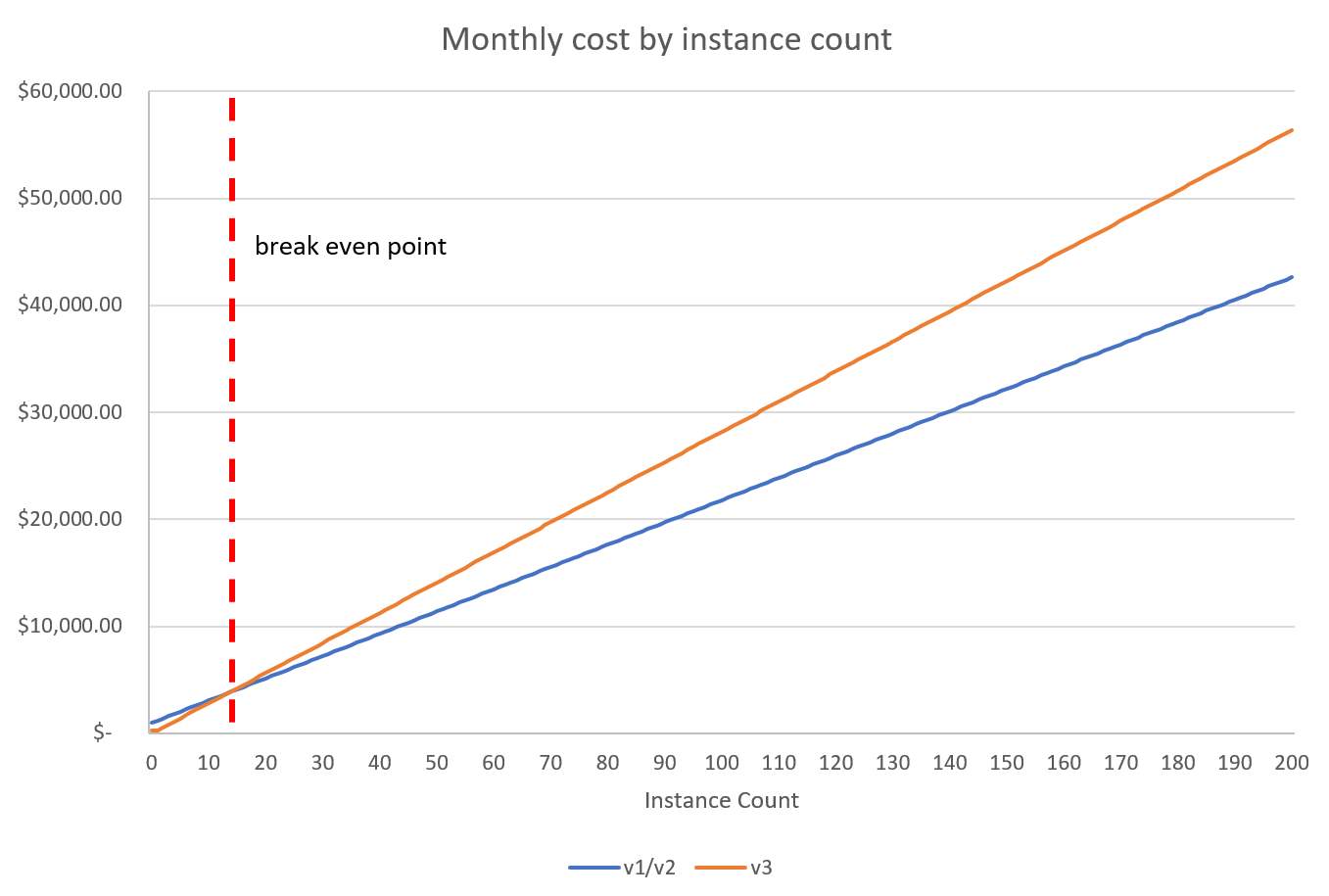
<p>This is a significant cost reduction, just know that you’re now over-provisioned since you now have double the cores and RAM, which you may not need. This is not an issue since the new environment is so much cheaper. However, when you start to have many I1 instances in a single App Service Environment, for example because you use this environment for dev or test workloads across multiple different apps and teams, you need to consider the break even point if you migrate to App Service Environment v3.</p>

<p>For this scenario, your App Service Environment v2 has 14 I1 instances. Because of how your environment is being used by your team, you can not reduce the number of instances or use a larger instance that has the same effective capacity. Your monthly cost is:</p>

<p><a href="https://azure.com/e/bd1dce4b5c8f4d6d807ed3c4ae78fcae">Stamp fee + 14(I1) = $991.34 + $2,912.70 = <strong>$3,904.04</strong></a></p>

<p>A migration of this environment to v3 would lead to the following monthly cost:</p>

<p><a href="https://azure.com/e/95a729b2ee2849c6847d88ef63140617">14(I1v2) = <strong>$3,944.92</strong></a></p>

<p>As you can see, your App Service Environment v3 is slightly more expensive than your v2. As you start adding more I1 instances, and therefore need more I1v2 instances when you migrate, the difference in price becomes even more significant and your v3 will get more and more expensive than your v2. Unfortunately, if you’re in this situation, you may have to plan for a higher monthly cost.</p>

<blockquote>
  <p>NOTE: This calculation was done with Linux $USD prices in East US. Break even points will vary due to price variances in the various regions. For an estimate that reflects your situation, see <a href="https://azure.microsoft.com/pricing/calculator/">the Azure Pricing Calculator</a>.</p>
</blockquote>

<p>The following chart visually depicts the break even point at the time of releasing this blog post using the selected region and price offering where App Service Environment v3 becomes more expensive than v2. If you need more than 13 of our smallest instance offering, you fall into this scenario. There may be other scenarios where this is also the case.</p>

<p><img src="/media/2023/03/break-even-point.png" alt="" /></p>

<h2 id="advanced-scenarios">Advanced scenarios</h2>

<p>The first three scenarios were basic and were intended to give you a quick sense of how pricing works on App Service Environment v3. Realistically, you’ll have many more instances and probably be using a combination of the SKUs. The following scenarios will give you a better sense of the cost saving opportunities for these use cases.</p>

<h3 id="scenario-4-sku-mix">Scenario 4: SKU mix</h3>

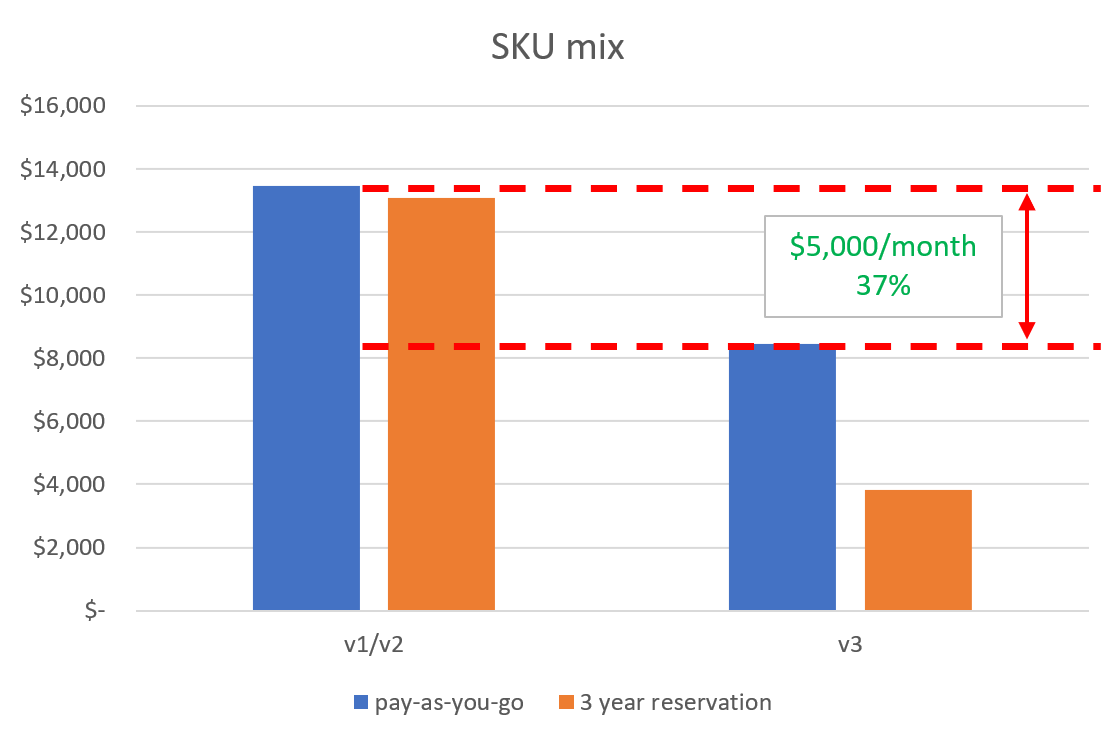
<p>To accommodate various app types in your App Service Environment v2, you use a combination of the tiers in various quantities. The first estimate will be using pay-as-you-go pricing, and the second will use a 3 year reservation on the stamp fee.</p>

<p><a href="https://azure.com/e/6139e2a572ab4d82a263278e08f61eaa">Stamp fee + 20(I1) + 10(I2) + 5(I3) = $991.34 + $12,483.00 = <strong>$13,474.34</strong></a></p>

<p>With a 3 year reservation, this becomes:</p>

<p><a href="https://azure.com/e/087b3549856945a1b620ad58ccced0c6">Stamp fee + 20(I1) + 10(I2) + 5(I3) = $594.77 + $12,483.00 = <strong>$13,077.77</strong></a></p>

<p>You can start to see here that as you consume more resources, the reservations available on App Service Environment v2 don’t significantly reduce monthly costs since they only apply to the stamp fee.</p>

<p>On App Service Environment v3, you require the same respective core and RAM capacity. There are various paths you can take here depending on your specific requirements - you can keep the same number of instances and just scale them down, or you can reduce the total number instance you are using. For this scenario, we’ll do the following:</p>

<ul>
  <li>20 I1 → 10 I1v2</li>
  <li>10 I2 → 10 I1v2</li>
  <li>5 I3 → 5 I2v2</li>
</ul>

<p>With pay-as-you-go pricing, this would be:</p>

<p><a href="https://azure.com/e/43a72b6bf449498f822a82cb0396e0ba">20(I1v2) + 5(I2v2) = <strong>$8,453.40</strong></a></p>

<p>And with a 3 year reservation:</p>

<p><a href="https://azure.com/e/99b162b41e944bbabfabf7f2d4d424bb">20(I1v2) + 5(I2v2) = <strong>$3,809.98</strong></a></p>

<p>At this point, you’re reducing your costs by over 70%. This is where the cost saving benefits of App Service Environment v3 really start to become significant. Even if you were to use pay-as-you-go pricing, you still see cost savings in the form of thousands of dollars per month.</p>

<p><img src="/media/2023/03/sku-mix.png" alt="" /></p>

<h3 id="scenario-5-migration-to-app-service-environment-v3-using-the-migration-feature">Scenario 5: Migration to App Service Environment v3 using the migration feature</h3>

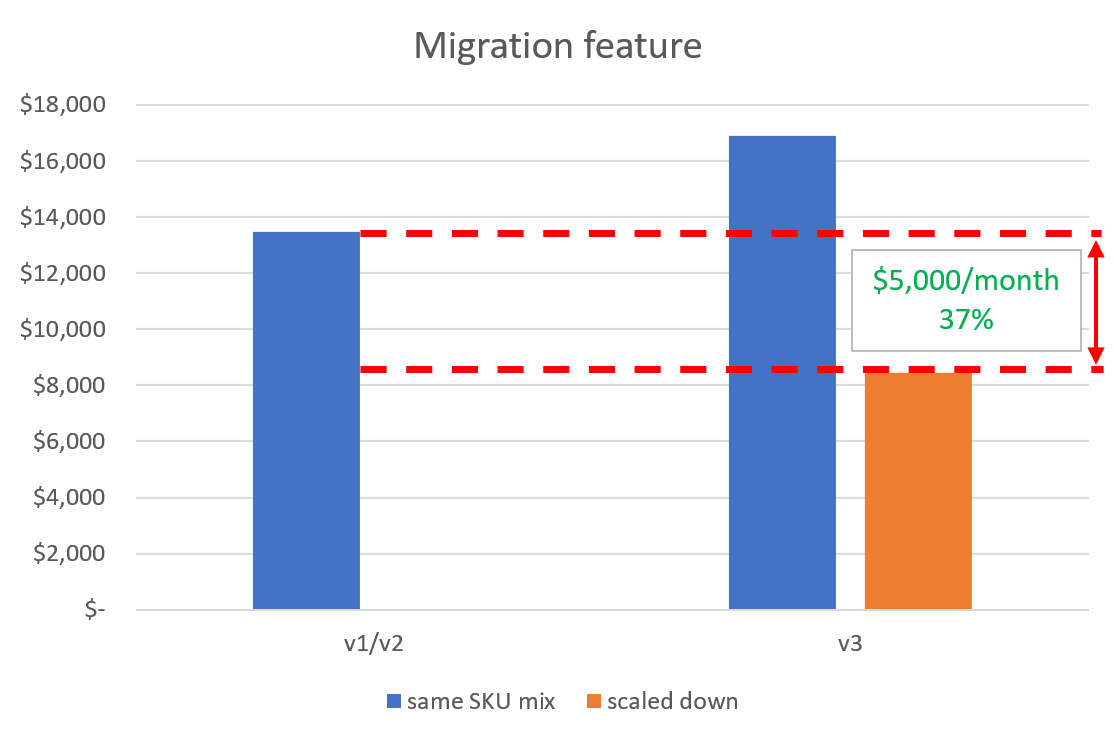
<p>The <a href="https://aka.ms/asemigration">migration feature</a> was developed to automate the migration of App Service Environments to v3. It’s an in-place migration, meaning it uses the same subnet your current environment is in. During the migration, your current environment is deleted and an App Service Environment v3 is spun up. All of your instances are automatically converted to their Isolated v2 counterparts (for example I2 is converted to I2v2). Since the Isolated v2 instances are larger, you’ll be over-provisioned if you’re still expecting the same traffic volume. This is a direct scenario where you have the opportunity to scale your instances down similar to what was done in <a href="#scenario-4-sku-mix">Scenario 4</a>.</p>

<p>To keep things consistent, we’ll keep the requirements for this scenario the same as <a href="#scenario-4-sku-mix">Scenario 4</a>. Your capacity requirements will not change after migration. Prior to migrating, your monthly pay-as-you-go cost is:</p>

<p><a href="https://azure.com/e/6139e2a572ab4d82a263278e08f61eaa">Stamp fee + 20(I1) + 10(I2) + 5(I3) = $991.34 + $12,483.00 = <strong>$13,474.34</strong></a></p>

<p>Immediately after migrating using the migration feature, your instances have been converted and you have the following leading to a higher monthly cost than what you had on App Service Environment v2.</p>

<ul>
  <li>20 I1 → 20 I1v2</li>
  <li>10 I2 → 10 I2v2</li>
  <li>5 I3 → 5 I3v2</li>
</ul>

<p><a href="https://azure.com/e/34c240000f004539bbf921bd2b5813c8">20(I1v2) + 10(I2v2) + 5(I3v2) = <strong>$16,906.80</strong></a></p>

<p>You’re significantly over-provisioned, so you scale down and immediately reduce your monthly cost by 50%.</p>

<ul>
  <li>20 I1v2 → 10 I1v2</li>
  <li>10 I2v2 → 10 I1v2</li>
  <li>5 I3v2 → 5 I2v2</li>
</ul>

<p><a href="https://azure.com/e/84abb76b9de64bd6bd639a0dcc846545">20(I1v2) + 5(I2v2) = <strong>$8,453.40</strong></a></p>

<p>You should plan how you will scale down prior to migrating to ensure you don’t get hit with unexpected costs due to being over-provisioned. You’ll be able to scale down immediately after the migration finishes.</p>

<p><img src="/media/2023/03/migration-feature.png" alt="" /></p>

<h3 id="scenario-6-reduce-total-number-of-app-service-environments">Scenario 6: Reduce total number of App Service Environments</h3>

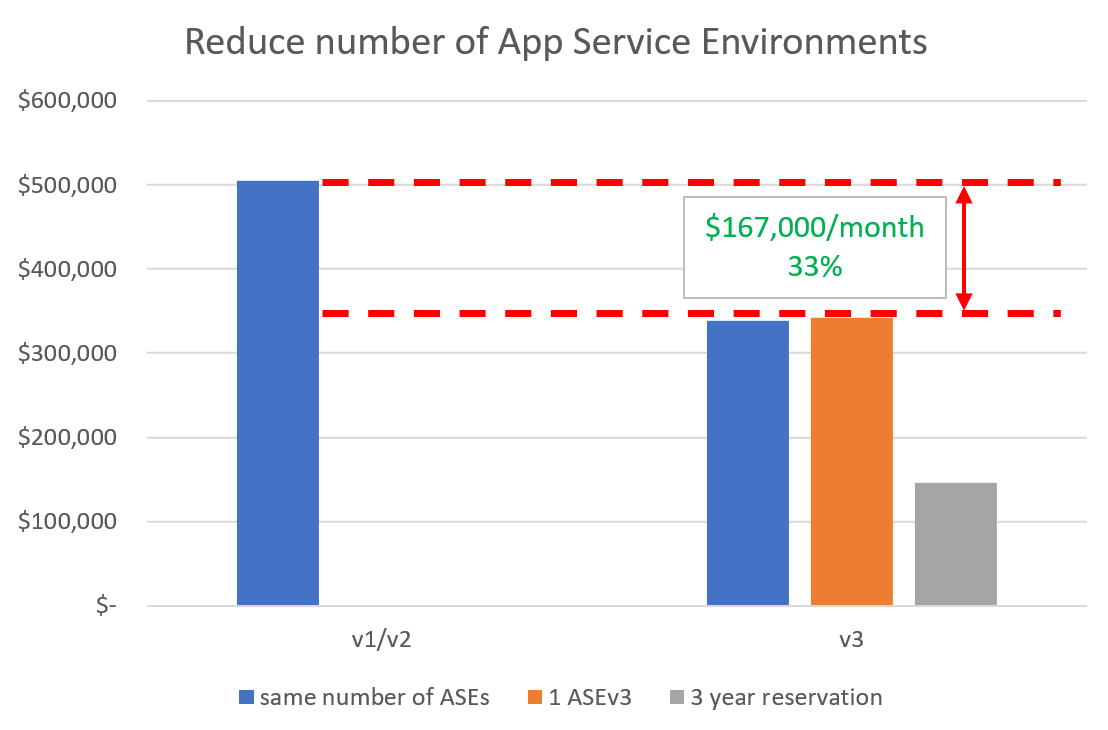
<p>App Service Environments are a great choice for customers that need to scale beyond the limits of the App Service public multi-tenant offering of 30 App Service plan instances. But even the 200 instance limit with App Service Environments may not be enough for some customers. In that case, they need to create multiple App Service Environments.</p>

<p>For this scenario, you have 3 App Service Environment v2s all at max capacity with 200 I3 instances in each. Your monthly cost with pay-as-you-go pricing is:</p>

<p><a href="https://azure.com/e/7d160cd7d861450bad0c999f7ba19b5b">3(Stamp fee + 200(I3)) = <strong>$505,268.04</strong></a></p>

<p>With App Service Environment v3, you have a couple options for how to proceed. You can continue using 3 App Service Environment v3s and just scale down to a smaller SKU, or you can reduce the number of environments by taking advantage of the new larger SKUs.</p>

<p>Keeping the same number of environments and scaling down would lead to a monthly cost with pay-as-you-go pricing of:</p>

<p><a href="https://azure.com/e/58a00f7ada9746339bb09f8bf20f87a0">3(200(I2v2)) = <strong>$338,136.00</strong></a></p>

<p>This would be further reduced if you were to use a reservation or savings plan.</p>

<p>If you wanted to reduce the total number of App Service Environments, this would be possible by using the larger SKUs that are only offered on App Service Environment v3. In addition to the potential cost savings you would see by reducing your instance counts and number of environments, you would also realize additional cost savings in the form of overhead since management would be over fewer resources.</p>

<p>For this scenario, the requirement is to have the equivalent of 600 I3 instances, or 2400 cores and 8,400 GB RAM. With App Service Environment v3, this can be accomplished with a single App Service Environment with 38 I6v2 instances. The pay-as-you-go monthly cost would be:</p>

<p><a href="https://azure.com/e/8be70aee48704f0aa7fc2ef9e909b017">38(I6v2) = 38($9,016.96) = <strong>$342,644.48</strong></a></p>

<p>This is just over the cost of the maintaining 3 App Service Environment v3s, but this doesn’t take into account the extra overhead involved in managing multiple resources. With 3 year reserved instance pricing, this monthly cost would be reduced significantly.</p>

<p><a href="https://azure.com/e/7baef8ad75444c43bba7dd42b0492532">38(I6v2) = 38($3,831.055) = <strong>$145,580.07</strong></a></p>

<p><img src="/media/2023/03/reduce-number-ase.png" alt="" /></p>

<h2 id="zone-redundant-app-service-environment-v3-pricing">Zone redundant App Service Environment v3 pricing</h2>

<p><a href="https://learn.microsoft.com/azure/reliability/migrate-app-service-environment">Zone redundant App Service Environment</a> deployments are only supported on App Service Environment v3. There is no additional charge for enabling zone redundancy if you have 9 or more instances. These 9 instances can be made up of any combination of the available SKUs. For example, you can have 9 I1v2s or 3 I1v2s, 3 I2v2s, and 3 I3v2s. You will only be charged for those 9 instances.</p>

<p>If you enable zone redundancy, and if your environment has fewer than 9 total instances, you’ll be charged the difference if the form of a minimum instance fee which uses the Windows I1v2 instance price. For example, if you have a zone redundant App Service Environment v3 with 3 Linux I3v2 instances, you will be charged for those 3 I3v2 instances at the standard Linux rate, plus 6 Windows I1v2 instances.</p>]]></content><author><name>Azure App Service</name></author><summary type="html"><![CDATA[If you weren’t already aware, App Service Environment v1 and v2 is retiring on 31 August, 2024. There are many reasons to migrate to App Service Environment v3 including better performance, faster scaling, and reduced overhead since networking dependency management has been greatly simplified. One benefit that stands out that we understand might need some additional explanation is that App Service Environment v3 is often cheaper than previous versions. With the removal of the stamp fee and larger instance sizes per respective SKU with previous versions, App Service Environment v3 can help you do more with less and reduce your monthly spend if you’re familiar with the updates.]]></summary></entry></feed>